
A lot goes into launching a business. And in the rush to get things moving, some details might go amiss. One that often gets ignored is your email setup.
New founders tend to stick with their personal Gmail or a free account just to cut costs. But this shortcut comes at a price.
Your email is an important (and free) marketing asset. Using an address tied to your website domain signals to clients that you’re legitimate. It tells them there’s a real company behind the name (and not just a weekend project). People are more likely to trust your offer when your email doesn’t look like it came from a hobbyist.
Simply put, getting your email right is part of owning your brand. In this guide, we’ll explore everything about a branded business email: what it is, why you should care, and best practices on setting one up. Let’s dive in!
What’s a Branded Business Email?
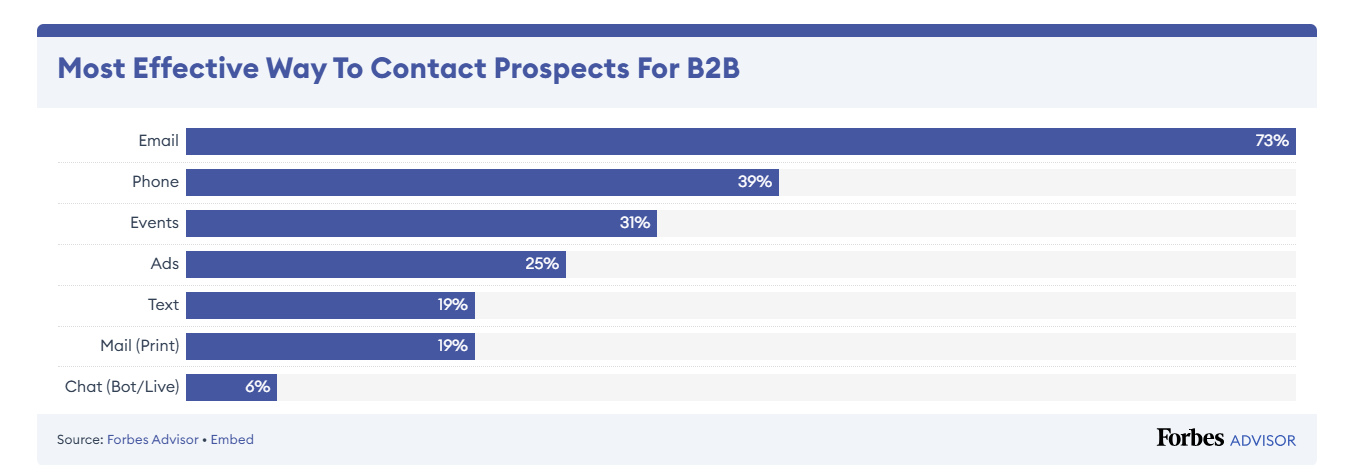
Emails are still the most preferred form of B2B marketing.
A branded business email is an email address that uses your company’s custom domain name instead of a public domain such as gmail.com or yahoo.com.
Technically, it follows the format [email protected], where yourdomain.com is the domain registered and owned by your business.
For instance, your email would read as [email protected] instead of [email protected] where greenhillstudio.com is your domain name.
Now, when you send an email from a professional email address, the domain part tells the recipient:
- exactly who you are
- where you’re coming from
- what your brand represents
The difference might seem small, but the impact isn’t (more on this in the upcoming section).
What’s also important to note is that the domain setup usually runs through a custom mail server or a hosted email service tied to your domain’s DNS records. You can configure it through providers like Google Workspace or Microsoft 365, which allow you to manage mail exchange (MX) records and route messages through your business’s branded domain.
Branded Business Email: What’s in It for Different Stakeholders?
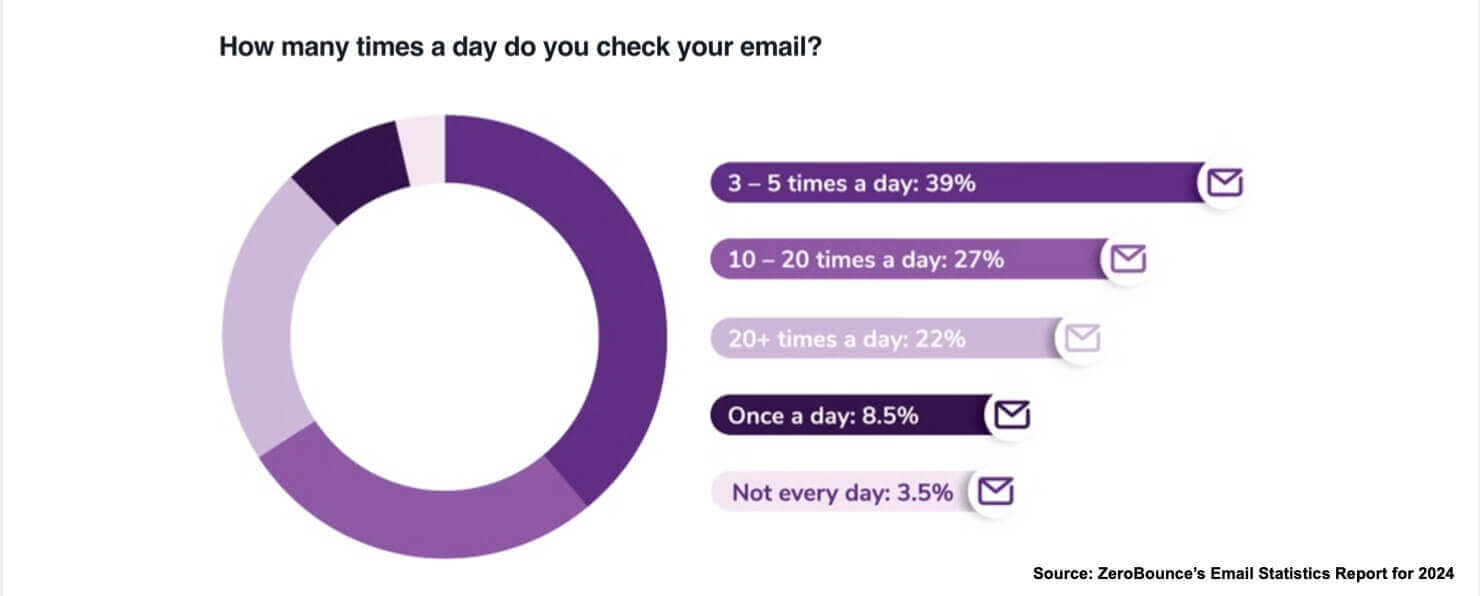
When someone hears from your business, your email is often the first thing they see.
If it doesn’t look trustworthy, your message may never get opened.
Here’s what a branded business email brings to the table, depending on who’s on the other end:
For Small Businesses and Startups
It helps you start with better organisation and structure.
- Shows You’re Professional: This kind of email builds credibility the moment someone sees it. You’re giving your business a face that looks established. Clients notice that. Investors do too. It shows that you’re not cutting corners.
- Keeps Your Processes Clean: A custom domain gives you control. You don’t want your business comms buried in the same inbox as social media alerts and personal subscriptions. Branded email helps separate your work from the noise.
- Readies You for Growth: As your team expands, you can easily roll out team@, billing@, or sales@ addresses. You’re building on solid ground as opposed to retrofitting as you go.
For Investors and Business Partners
It helps you send the right signal before the pitch even starts.
- Conveys Operational Maturity: As mentioned earlier, public email addresses (like [email protected]) don’t give you that control. You don’t own the domain, and that limits how professional you appear and how much trust you build from the first interaction.
- Protects Sensitive Conversations: Branded email runs through infrastructure you manage. You decide who has access, how data is handled, and what gets archived. That level of control matters when sharing decks, contracts, and early-stage plans.
For Customers
Here’s how it stands out:
- Drives Instant Recognition: When your email ends with your domain, you’re reinforcing your brand every time you hit send. People often check out that domain to learn more about what you do, especially if your message piques their interest.
- Builds Brand Recall: Each message reinforces your name and makes it easier for customers to remember who you are. You’re building familiarity in their inbox.
- Reduces Chances of Getting Flagged: Free email accounts tied to platforms like Gmail or Yahoo might work short-term, but they don’t speak for your business. They don’t carry your name, and that means they don’t carry your reputation either. Branded email gives you better deliverability and a cleaner path to the inbox.
For Internal Teams and Stakeholders
Here’s why it matters:
- Sets a Professional Standard: A consistent email structure gives your business a unified look and feel. Everyone’s on the same page and literally speaking from the same domain.
- Makes Onboarding Smoother: You can assign emails based on roles and departments. It simplifies setup and gives new team members a sense of ownership and clarity from day one.
- Keeps Your Business Data In-House: When someone leaves, you still own the account and the communication history. You’re not stuck tracking conversations across personal inboxes and losing access to important threads.
The Takeaway: A branded business email is a framework that supports how your business runs, earns trust and communicates at every level. The return on this simple setup is clarity, consistency, and control—three things you can’t afford to compromise.
Why You Should Stop Using a Free Email for Your Business
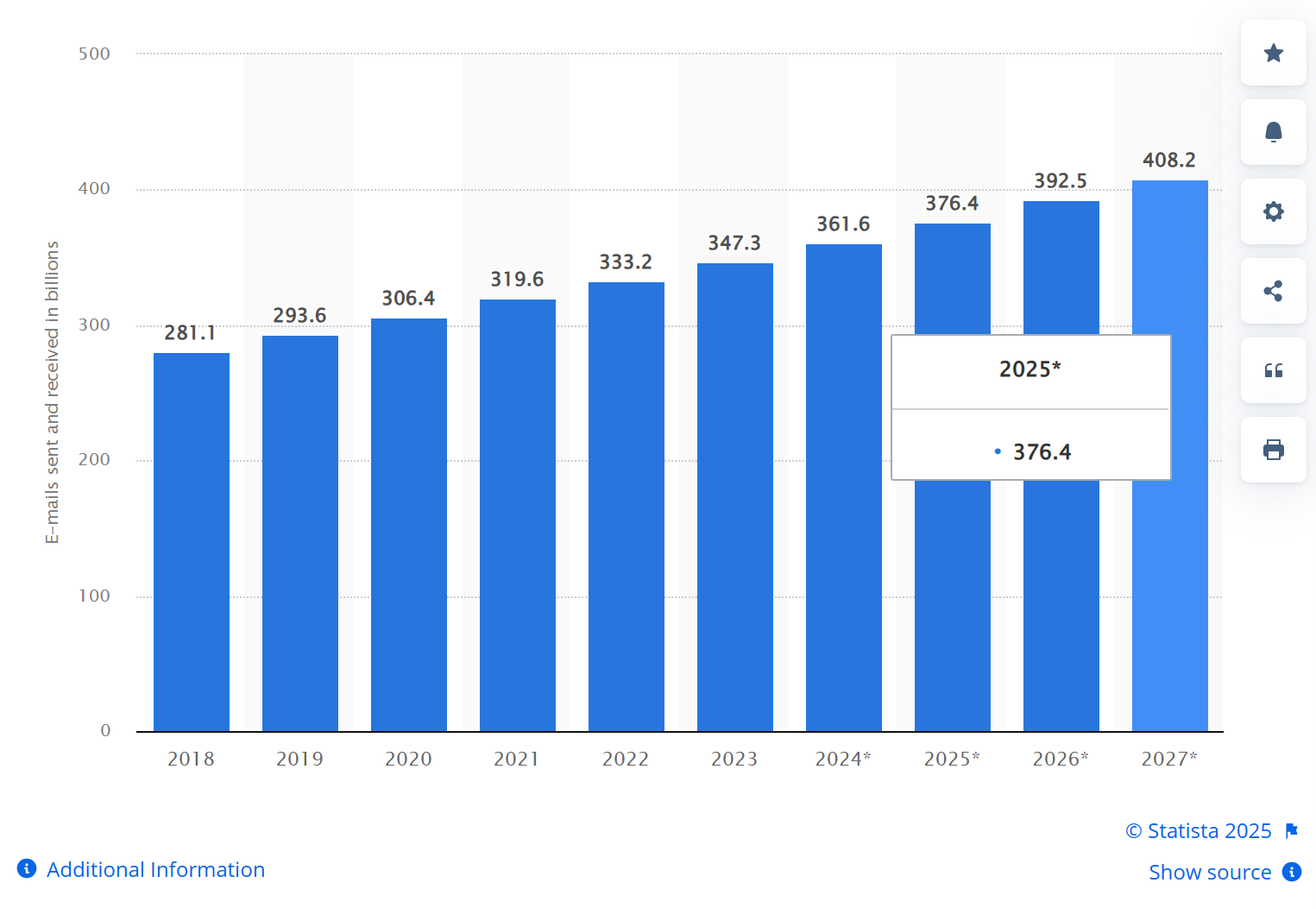
There will be about 4.6 billion email users worldwide—up from 4 billion in 2020. Email also gets more clicks than social media when used for online ads.
Clearly, if you’re still using a generic email address to run your business, you’ll be struggling to find a legitimate space for your brand in your customer’s mind.
A domain-based email changes how customers, partners, and platforms treat your business.
Here’s a breakdown of what a custom email really gives you and why making the switch is one of the easiest, most impactful upgrades you can make:
Business Benefit |
What It Means for You |
The Problem It Solves for Site Owners |
| Build trust from the first email | Use your domain for all outgoing emails to create a professional first impression. Start every email with clear branding and a consistent signature to reinforce reliability. | Free emails look amateurish and make customers doubt your professionalism and security. |
| Simplify your daily workflow | Set up your email and website hosting on the same platform to manage both with one login. This reduces time wasted on juggling accounts and speeds up troubleshooting. | Managing separate accounts for email and web slows you down and causes confusion. |
| Amplify your brand recognition | Customise email templates with your logo and brand colours. Encourage your team to use consistent email signatures. Track email open rates to see how branding boosts engagement. | Generic emails don’t promote your brand, making it harder for customers to remember or trust you. |
| Increase your email open rates | Authenticate your domain with SPF, DKIM, and DMARC records. Send a strong welcome email to new contacts to establish credibility and avoid spam filters. | Emails from free accounts often land in spam, losing potential leads without your knowledge. |
| Scale your team communication easily | Create unique email addresses for each employee or department. Use aliases and forwarding to organise communication. Automate common replies to handle frequent questions efficiently. | Shared or generic emails limit team communication and confuse customers about who they’re dealing with. |
| Get expert support when issues arise | Choose an email provider with reliable customer support via phone or chat. Use tutorials and forums for quick fixes. Regularly back up emails to prevent data loss. | Free email services often lack dedicated support, leaving you stuck during technical problems. |
| Secure your exact business identity | Register a domain that matches your business name. Avoid numbers or symbols that confuse customers. Reserve related domains to protect your brand online. | Free accounts rarely allow your preferred business name, causing unprofessional, confusing addresses. |
| Adapt quickly as your business grows | Update your domain emails instantly if your business rebrands or expands. Maintain control of all accounts centrally to avoid disruption. | Changing emails on free services means losing access or confusing contacts, harming continuity. |
| Unlock productivity tools built-in | Use email platforms that include calendars, cloud storage, and video conferencing. Integrate these tools into daily workflows to save time and boost collaboration. | Separate free services lack advanced features, forcing you to juggle multiple apps inefficiently. |
| Protect sensitive information | Enable two-factor authentication and encryption on your branded email. Regularly update passwords and monitor for suspicious activity. Store all communication on secure servers. | Free email providers have weaker security, putting your business data and client info at risk of breaches. |
How to Build a Branded Business Email Strategy That Works? 10 Best Practices + Tips
Getting your domain is only the beginning.
The real challenge is creating emails that actually feel like they belong to your brand—not just because your logo’s in the corner, but because the tone, layout, and structure all say the same thing: this is us.
Most businesses think brand consistency means matching colours and fonts. But it’s the subtle decisions: naming conventions, email structure, the way your copy sounds in someone’s inbox, and so on that quietly build recognition and trust over time.
This is what gets people to click without second-guessing and makes your email campaigns stick.
Here are ten practical tips to help you create a branded email that holds up under pressure and scales as you grow:
Tip #1: Create a Smart, Repeatable Email Address Format
Randomised inbox names confuse customers and fragment your brand.
Decide early how you’ll structure email addresses for internal teams, transactional messages, support, and newsletters. Consistency makes it easier to route replies, manage sender reputations, and keep things human.
Brainstorm Questions:
- Can someone guess your support email just by knowing your domain?
- Are your reply-to addresses aligned with how your teams actually work?
- Do your contact names reflect your org structure?
Pro Tips:
- Use naming formats that won’t need to change when staff leave or roles shift.
- Separate marketing sends from personal team inboxes.
- Avoid unbranded handles like noreply@ — they signal disconnection.
- Create naming patterns even for automated workflows (e.g. billing@, updates@).
- Keep internal naming conventions documented and shareable across departments.
Tip #2: Design for Familiarity and Coherent Visual Identity
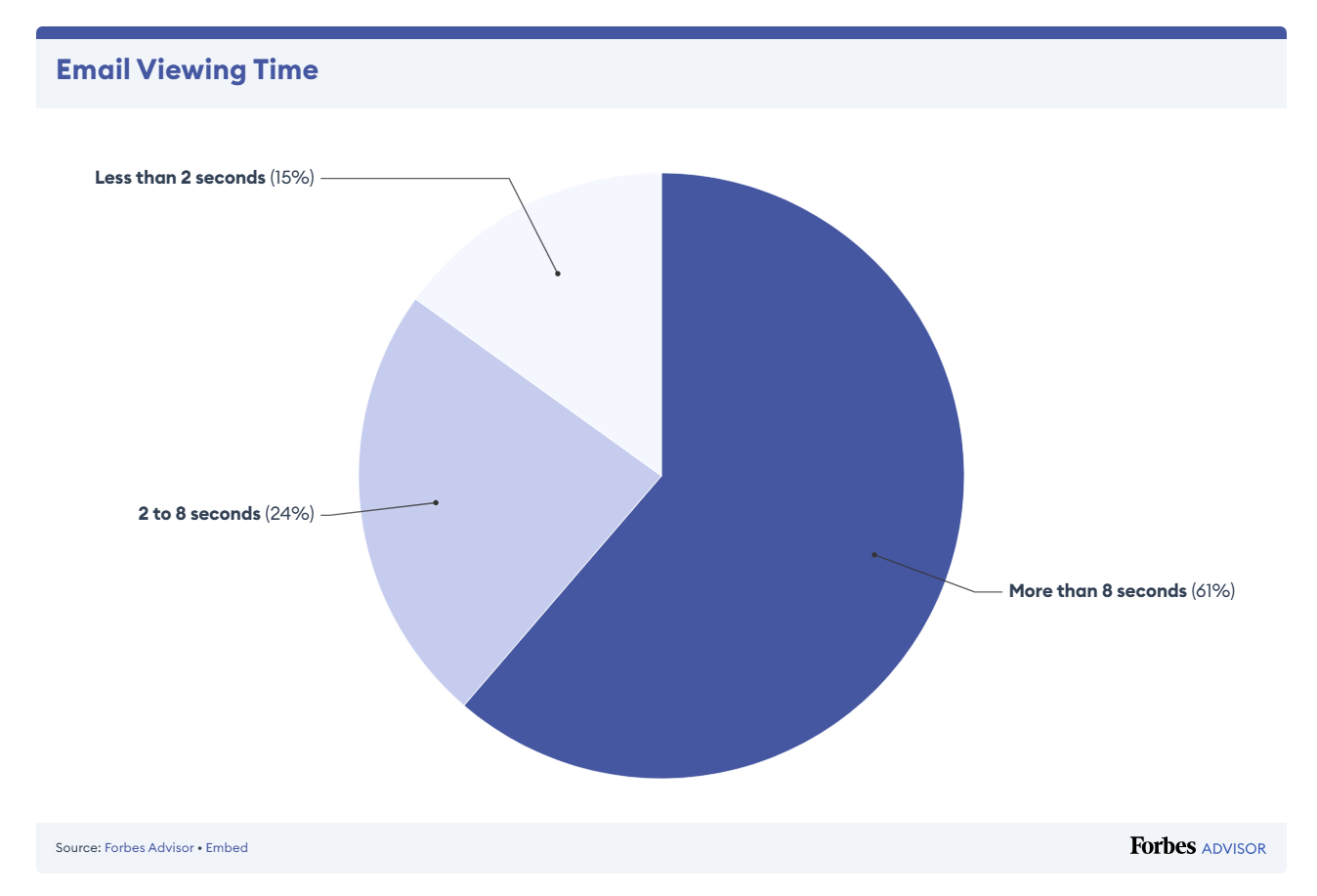
A branded email should feel recognisable the second it loads. That doesn’t mean loud headers and definitely no gimmicky visuals. You need a layout your readers grow used to: one with the same hierarchy, same button placements, and similar spacing.
Brainstorm Questions:
- What do your last 5 campaigns look like side by side?
- Does your layout encourage fast scanning or create visual dead ends?
- Would someone know it’s your email before even reading the sender line?
Pro Tips:
- Use the same fonts and hex codes you use on your site.
- Build one master template and clone it. Don’t rebuild layouts from scratch.
- Make sure your logo placement is consistent across every campaign.
- Align CTA button shapes, sizes, and colours with what users already recognise on your site.
- Limit yourself to one or two visual templates per type of email.
- Use negative space to lead the eye.
- Don’t switch font styles between devices; keep mobile layout clean and linear.
Tip #3: Standardise Your Subject Line (like You Would Your Logo)
People decide to open your emails based on instinct. The subject line is your first impression and should always sound like you. Standardise the structure, word count, and tonality of your subject lines to build inbox recognition.
Brainstorm Questions:
- Is your subject line tone aligned with how your website speaks?
- Do you write differently when announcing versus, say, promoting?
- Would your reader spot your subject line in a crowded inbox?
Pro Tips:
- Pick a writing pattern and stick to it (think: question format, short punchlines, offers up front).
- Avoid “bait and switch” headlines, your readers hate it.
- Use the same email sign-off and greeting structure across the team.
- Keep formatting habits uniform: bullet styles, headline casing, quote blocks, etc.
- Limit adjectives. Stick to verbs that prompt action across campaigns (such as Discover, Unlock, Here’s).
- If you use humour or emojis, define where and how often they appear.
- Match preview text to subject tone, it’s part of the impression.
- Test subject lines using real user behaviour.
Tip #4: Build for Mobile First, Then Clean up for Desktop
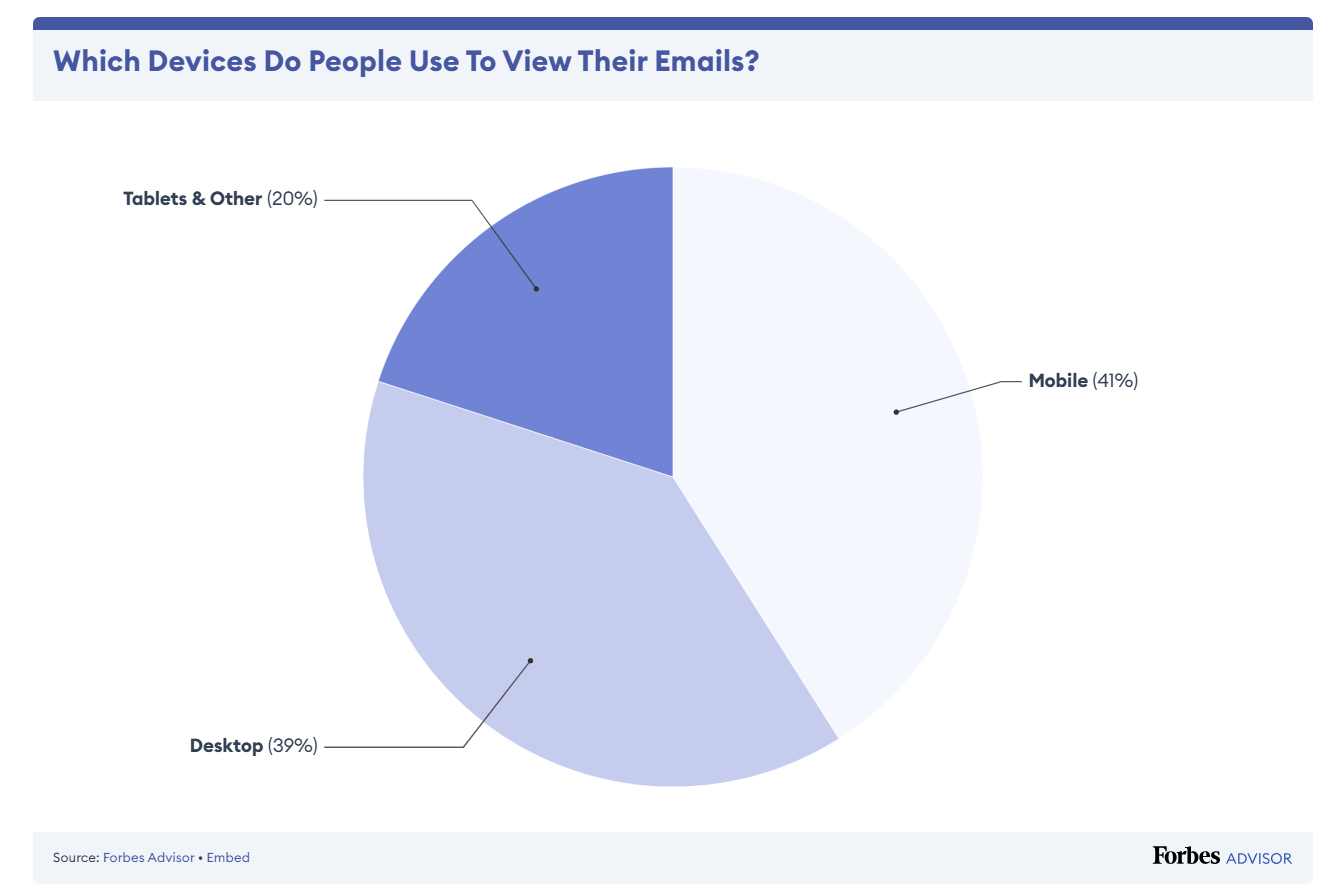
About 41% of emails are read on phones. If your layout collapses and your buttons are too small to tap, your message will get ignored.
Brainstorm Questions:
- Does the email load fast and clean on all mobile devices?
- Are key messages visible without scrolling?
- Are links and buttons large enough for thumbs?
Pro Tips:
- Avoid multi-column layouts. We suggest sticking to single-column emails.
- Use responsive templates that adapt based on the device screen.
- Keep CTA buttons above the fold. Don’t bury the ask.
- Test across devices (and no, your email builder preview isn’t enough).
- Don’t use image-only emails. Always have live text for accessibility and load time.
Tip #5: Don’t Let Broken Emails Leave a Bad Impression
A broken email translates to carelessness on your part. A single broken link or chaotic layout can cost your business dearly.
Brainstorm Questions:
- Are all links, buttons, and images working and optimized before you hit send?
- Does the email render well in Outlook, Gmail, and Apple Mail?
- Are your fallback fonts and background colors properly set?
Pro Tips:
- Always send test emails to multiple clients and devices.
- Set alt text on every image. Broken images shouldn’t leave gaps.
- Avoid using too many different content blocks—stick to tested sections.
- Compress image sizes before uploading.
- Set a default background colour that matches your brand palette in case images don’t load.
Tip #6: Build Consistency Into Your Automation Logic
Branding is how you structure time, triggers, and messaging across your automation flows. Uncoordinated drip sequences, follow-ups, and delays can make your communications feel disjointed (even if the emails appear professional).
Brainstorm Questions:
- How often do you copy-paste from old campaigns?
- Do your automation steps accurately reflect how your customers experience your product?
- Are delays and triggers standardized across journeys?
- Would a user receive emails that contradict or overlap with each other?
- What parts of your workflow take the most time?
Pro Tips:
- Build and save 2–3 branded templates for different campaign types (e.g. newsletter, promo, launch).
- Map every email touchpoint from sign-up to re-engagement on a single timeline.
- Reuse blocks like footers, disclaimers, and contact links.
- Build a central content library of images, icons, and CTAs.
- Label and archive every past campaign clearly so you can repurpose it fast.
- Sync your email builder with your CMS or CRM to auto-populate dynamic content.
- Audit flows for overlap or contradiction between automations.
- Add fallback logic to prevent multiple sends within short windows.
- Always preview full sequences instead of single email drafts.
Tip #7: Establish a Plain Text Template for Text-Based Emails
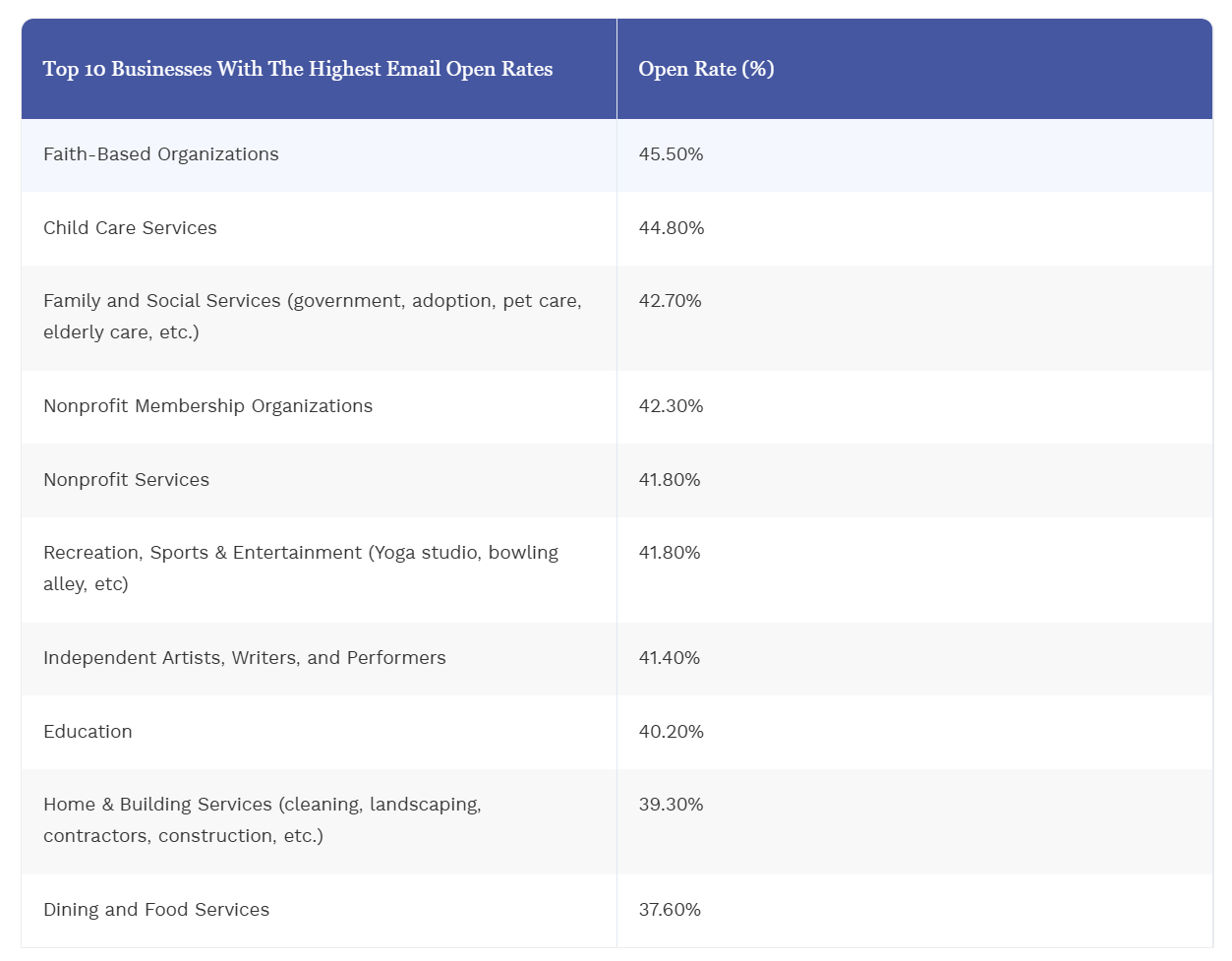
Some of your most effective emails won’t have a single graphic. Onboarding flows, security alerts, payment reminders: they live and die by structure and tone. A standardised plain-text format helps them stay on brand without a single pixel.
Brainstorm Questions:
- Are your plain-text emails just dumped content or structured with intention?
- Do they follow a voice that matches your marketing style?
- Can users skim and still understand the point?
Pro Tips:
- Use the same sentence structure and formatting conventions (read: bold for key info, dashes for lists, etc.).
- Keep subject-verb-object sentence formats for clarity.
- Add whitespace between ideas; remember dense walls of text break readability.
- Write like a person with relatable content.
- Include a consistent signoff that reflects your tone (for example: Thanks for being with us).
Tip #8: Decide Who Writes What—and Document It
Most inconsistency comes from too many cooks and no playbook. If more than one person writes your emails, define voice, tone, and editorial style across your campaigns. Set guardrails for language, formatting, punctuation, and structure.
Brainstorm Questions:
- Who owns your email tone—marketing, copy, or whoever sends it?
- Is there a checklist before an email goes out?
- How are hand-offs managed between design and writing?
Pro Tips:
- Create a shared email style guide (not a brand book but a separate one for email).
- Include tone examples for sales, product updates, and community outreach.
- Review past campaigns and flag tone inconsistencies as team exercises.
- Make the final review a standard step in the email pipeline.
- Avoid “freelancer drift” and align external contributors with internal voice rules.
Tip #9: Track the Right Metrics
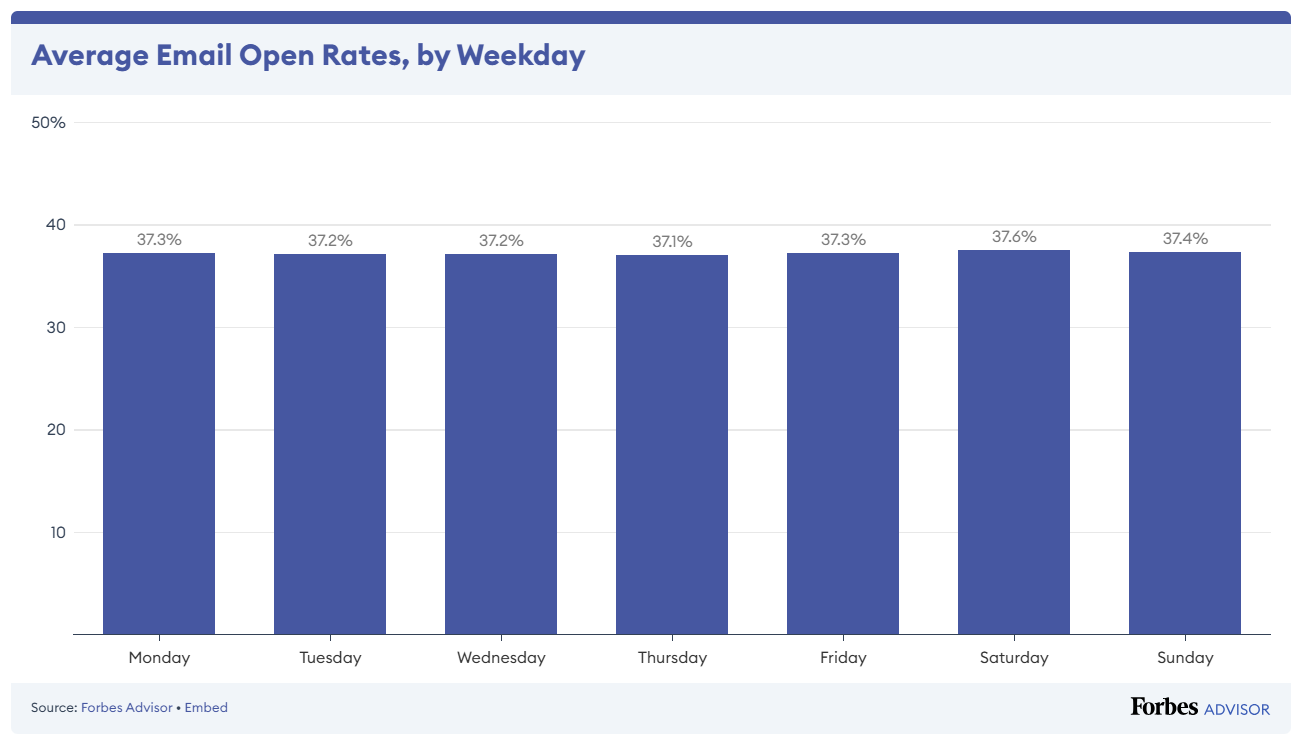
Did you know that the best time to send marketing emails is Tuesday at 12 p.m., as per Forbes?
Sure, sending emails at the right time can help boost open and click rates. But this is also why you need to analyse the right metrics to understand what your readers like when they’re reading your emails and more.
Brainstorm Questions:
- Are you measuring clicks or just opens?
- Do you know which sections users are actually reading?
- How do you track performance beyond one send?
Pro Tips:
- Track scroll depth and link heatmaps as well.
- Set up UTM tracking for every CTA.
- Measure repeat opens and forwards to identify high-trust content.
- Separate transactional from marketing emails when analyzing metrics.
- A/B test subject lines and CTA text.
Tip #10: Build a Feedback Loop Inside Your Team
Emails often go out without review. A second set of eyes can catch tone issues, typos, and broken logic.
Brainstorm Questions:
- Who signs off on each campaign?
- Is there a checklist before every send?
- How does your team share feedback on past sends?
Pro Tips:
- Use a shared email campaign QA checklist.
- Run dry sends to internal staff for tone and flow review.
- Store examples of high-performing campaigns for future reference.
- Collect and analyse reply emails to find friction points.
- Host monthly reviews to look at data, wins, and lessons learned.
Set Up Your Branded Email with BigRock
You don’t send emails to tick a box. You send them to get noticed, be remembered, and move things forward. That only happens when your email address looks branded, sounds familiar, and feels like an extension of your business.
BigRock helps you get there. You get to create a custom email address with Titan, one of our highest-rated email platforms for small businesses. Some of our features include ready-to-use email templates, a schedule send feature, a follow-up reminder feature, and more.
Ready to start creating a branded email? Connect with our team now!










