If you’ve searched for an answer online, read a product review, or followed someone’s personal journey on the internet, you’ve likely read a blog.
A blog may share practical advice, professional knowledge, company news, or personal stories. It can stand alone or sit within a larger website.
Blogging, on the other hand, refers to the work behind that space: planning ideas, writing or producing posts, publishing them, and keeping the information useful.
If you’re thinking whether blogging is for you or if it suits your goals, this guide will explain everything there is to help you decide—what is a blog, why people create them, its benefits, and types. Let’s also take a deeper look at how you can build one that works for your purpose.
What Is a Blog?
A blog is short for ‘weblog.’ It’s a regularly updated website (or a dedicated section of a larger website) where new content is published consistently.
Unlike web pages that rarely change, blogs are updated with fresh content regularly. They’re distinguished by their dynamic nature and conversational tone. Most are also displayed in reverse chronological order. New posts appear on top of the results page where readers see your latest updates first.
A few more key questions on blogs:
- Who publishes blogs? Anyone can run a blog. Individuals, small business owners, corporations, and freelancers all use blogs to reach their target audience. Transparency helps build trust, so blog posts are usually attributed to a specific person or team rather than presented anonymously.
- What do readers do on a blog? Readers find answers, learn, be entertained, browse related posts, subscribe, and/or share content on social media platforms. If comments are enabled, they can leave comments and join an ongoing conversation.
- What’s the history of blogging and why are blogs still relevant? Early blogs began in the mid-1990s as a way for people to share personal stories, experiences, and interests—much like an online diary or online journal. It evolved over time, giving rise to focused or niche websites, business blogs, professional blogs, and educational resources. Even mainstream media adapted the format later on for breaking news and editorials. Despite the popularity of short-form videos, blogs are still relevant because they:
- Explore complex topics in far more depth.
- Let readers consume blog content at their own pace and revisit it any time.
- Use internal links to guide readers to related content, increasing engagement and time on site.
What Is the Purpose of a Blog?
Blogs can serve multiple purposes, such as sharing information, building an online community, or boosting marketing. Their goals vary, but most blogs exist to inform, engage, and attract a dedicated readership through consistent publishing.
Primarily, here are why people and businesses maintain a blog:
- Connect with people and build an online community
- Share knowledge, show expertise, and build brand voice
- Support business and marketing goals
- Give creators a space to publish and grow
- Highlight success stories and customer testimonials
Connect With People and Build an Online Community
Human authenticity wins, most especially today where everything is AI-generated. The brands and creators that stand out are those that feel the most human. And blogs help you form real connections by sharing genuine stories and insights.
Blogging communities and other virtual communities thrive on interaction. When readers connect with your voice, they’re more likely to leave comments, share your content, and join the conversation. Over time, this helps you build a loyal online community around your brand or content.
Share Knowledge, Show Expertise, and Build Brand Voice
Blogs help educate readers through tutorials, explanations, and practical advice on topics like personal finance. Many take the form of how-to guides and walkthroughs that help readers solve problems.
They also help professionals and businesses showcase their expertise and build credibility. Unlike static website pages, blogs give you space to develop a distinct brand or personal voice, share your values, and offer unique insights in a more conversational way. Consistently publishing authentic content helps them trust and remember your brand.
Support Business and Marketing Goals
For a business, blogging can support education, discovery, and customer communication without making every article a sales pitch. Business blogs can explain services, answer pre-purchase questions, and announce useful updates. It can be a practical part of content marketing.
One blog post can support several channels. You may adapt its key points for social media or share the article through email marketing. The blog remains the detailed source, while email and social posts distribute it. It reduces duplicate effort and gives interested readers a clear place to find the full explanation.
Give Creators a Space to Publish and Grow
A blog is a space that you completely own. Unlike third-party social media algorithms that can change overnight, your blog gives you total control over your work. You can begin writing about new ideas, test different types of blogs, and publish on your own schedule. It can serve as a platform for establishing a sustainable personal brand.
Highlight Success Stories and Customer Testimonials
Blogs provide an excellent platform for sharing real-world success stories, case studies, and customer testimonials. Readers are often far more influenced by authentic personal experiences than by traditional promotional claims.
By sharing detailed personal stories of how a customer used your product to solve a problem, you make your services feel much more credible, trustworthy, and relatable to prospective buyers.
What Are the Benefits of a Blog?
A successful blog can attract the right visitors, make a website more useful, strengthen trust, and create an owned collection of information that keeps working over time.
Specifically, it has these benefits:
- Converts traffic into leads
- Increases search visibility and supports SEO
- Builds a cost-effective and long-term marketing asset
Converts Traffic Into Leads
Many people discover blog posts while searching for answers or solutions. With valuable content, you can attract readers, generate traffic, and turn them into subscribers and potential customers.
Well-placed calls to action (CTAs), lead magnets, and internal links can guide you target audience toward the next step. You can ask them to sign up for a newsletter, download a resource, request a consultation, contact your business, or explore your products and services. Use this blog traffic to convert visitors into qualified leads.
Increases Search Visibility and Supports SEO
Search engine optimization (SEO) helps your website get found online. Every new blog post creates a chance to appear in search engine results.
Blogs help you target relevant keywords and cover topics your audience cares about. You have a space to answer common questions and make your content useful to both readers and search engines.
By consistently publishing helpful content, using internal links, and keeping your site updated with fresh information, you can improve search visibility over time. The more valuable content you create, the more opportunities you have to attract organic traffic from search.
Builds a Cost-Effective and Long-term Marketing Asset
Unlike paid advertising—where your traffic completely stops the moment your budget runs out—blogging builds a long-term marketing asset. You own the platform, so your owned content continues to work for you around the clock.
Well-optimized blog content can keep bringing in organic traffic, leads, and sales months or even years after its original publication date. This makes blogging one of the most cost-effective marketing strategies available.
What Is the Anatomy of a Blog?
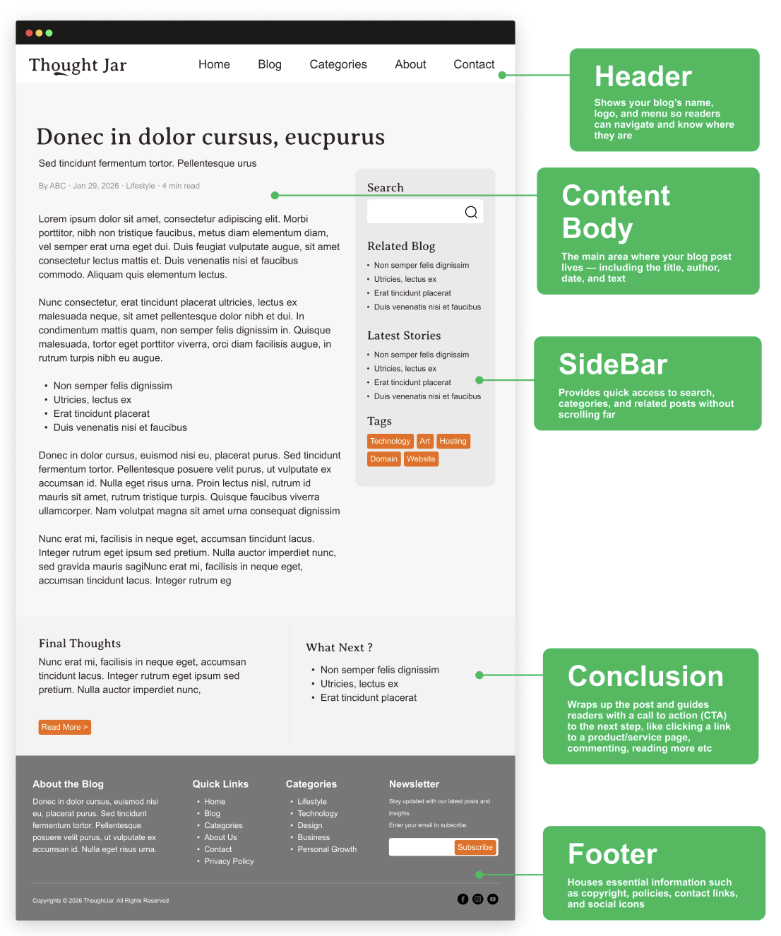
If you look at other blogs, you’ll notice they follow a similar structural pattern. It has a header, body, and conclusion. This familiar structure helps visitors navigate your site intuitively.
Core Components of a Blog
- Header: Sits near the top of the blog and usually contains the site name or logo and the main navigation. It may link to categories, an About page, services, products, or contact information. Readers use this area to understand their current location (in your blog) and navigate to other pages.
- Content body: This is where your blog posts appear—the main reading area. Each post usually includes a title, the author’s name, the date, and the main text. Your content could be how-to posts, updates, or personal stories, and may include images, video, quotations, and links to support your explanation. When posts are easy to read, people tend to spend more time on the page.
- Sidebar: Some blogs use a sidebar to help readers navigate to additional content without needing to scroll too far. It’s optional, especially on smaller screens, and should help readers explore rather than distract from the main article. Sidebars are most useful on niche blogs, where readers often want to jump between related posts. They could be:
- A search bar to look up specific topics
- Links to recent or popular posts
- Categories or tags to browse by topic
- Newsletter signups or ads
- Conclusion and Call to Action: The end of a post is where you close out your message and suggest a next step, like leaving a comment, reading another post, signing up for updates, or checking out a product. Your CTA should match the reader’s stage and the article’s purpose; not every post needs an immediate sales request.
- Footer: The footer sits at the bottom of your blog. It’s where you usually place details people expect to find, such as a copyright notice and year; links to your privacy policy, terms of service, disclaimer, and cookie policy; a small logo or tagline; social media icons; and contact details. This section helps visitors find important information and adds credibility, especially on business blogs and branded sites.
What Are the Different Types of Blogs?
People blog for different reasons. Most successful blogs focus on a specific subject or niche, such as travel or technology. Popular blog types include food, travel, and fashion blogs.
Here are some of the most common blog types or formats you will encounter:
- Personal blogs
- Business or corporate blogs
- Affiliate and review blogs
- Multimedia blogs
- News blogs
- Niche blogs
Personal Blogs
Personal blogs are where you write about your own thoughts, opinions, and personal experiences. Posts often employ an informal or conversational style, covering everyday topics or sharing life updates. Many people use personal blogs to build a personal brand or document their journey online.
Business or Corporate Blogs
Business blogs are run by companies or professionals to support marketing efforts. These professional blogs publish helpful website content, including industry insights, product updates, and practical guides. They help businesses reach the right readers, show expertise, and become easier to find in search engines.
Affiliate and Review Blogs
Affiliate and review blogs focus on recommending products or services. Posts often include comparisons, buying guides, and sponsored posts. When done well, these blogs share valuable insights and earn income through referral links.
Multimedia Blogs
Multimedia blogs rely heavily on visuals, such as videos, photos, or audio. You’ll still see written blog posts, but images and media usually take the lead. These blogs work best on an online platform that supports media-rich publishing.
News Blogs
News blogs cover current events, trends, and updates. They publish content frequently and often follow a reverse chronological order. These news blogs aim to share timely information and appear in search engine results pages when people search for breaking or trending topics.
Niche Blogs
Niche blogs focus on one specific subject rather than covering multiple topics simultaneously. This focus makes them easier for readers to follow and more manageable for creators.
Common examples include:
- Food blogs that share recipes and cooking tips
- Travel blogs that publish guides and destination advice
- Parenting blogs that cover family life and advice
- Fitness blogs that focus on workouts, habits, and health
Because niche blogs focus on a single subject, they often attract readers who are looking for very specific information and tend to perform well in search engine results.
Each blog type serves a different purpose, but they all share one thing in common. They publish relevant content, understand their audience, and follow a consistent blogging strategy.
Who Should Start a Blog?
Anyone with insights, skills, or stories to share can start a blog.
Blogging isn’t limited to professional writers or marketers. A student can document a learning journey, a freelancer can explain a process, a hobbyist can teach a skill, and a small business can answer customer questions. Again, anyone with knowledge, experiences, opinions, or a distinct point of view can build a worthwhile personal blog or professional blog.
Over 600 million blogs exist today, yet approximately 70,000 new blogs are created daily. There’s clearly a global appetite for unique perspectives and valuable information. So whether you’re launching a personal blog to document a hobby or a professional blog to establish yourself as an industry thought leader—you have knowledge to share, you’re ready to start and begin writing.
Blog vs. Website: What’s the Difference?
These two are closely related, but they’re not exactly the same thing.
A blog can be a standalone website or one section within a larger site. Many modern company sites combine stable pages for services and contact information with a blog that publishes new articles.
In other words, a blog is a type of website or website section, but not every website includes a blog.
Understanding the Difference
The easiest way to understand the difference is by looking at the content structure. Traditional websites are structure-driven. They rely heavily on static pages—like a “Contact Us” or “About Us” page—that rarely change. Their primary goal is to provide core information and navigation.
Conversely, a blog is content-driven. It relies on a steady stream of regularly updated website content consisting of article-based blog posts.
While a blog can be part of a website, not every website has a blog. Blogs prioritize freshness and engagement, whereas standard web pages prioritize stability.
Do You Need a Blog, a Website, or Both?
Choose based on what you need visitors to do.
A writer who mainly wants to publish essays may start with a blog as a standalone website. A local service provider that needs to show services, opening hours, and contact details may begin with a small traditional website. A company that wants both clear business information and ongoing educational content may need both.
Ask whether your priority is publishing, presenting stable information, or combining the two. Business blogs are usually most useful as part of a broader website because articles can connect readers to relevant service, product, or contact pages. There’s no need to create two separate sites when one well-organised site can support both purposes.
How To Start a Blog
Starting your own blog is much easier than it used to be. You can start a blog in less than an hour. Once you understand your goals and have a strategy to gather data and insights, the technical setup is incredibly fast. (For a comprehensive, step-by-step technical walkthrough, check out our detailed guide on How to Start a Blog).
Here’s a high-level look at the process:
- Choose your topic and audience
- Pick a blogging and hosting platform
- Design the blog and set up essentials
- Publish your first blog post
Step 1: Choose Your Topic and Audience
Before creating content, you must choose a blog topic and clearly define your target audience. Focus on a subject you’re genuinely knowledgeable about and can write about consistently for years to come.
The best niche blogs succeed because they provide relevant content that solves specific problems for a very specific group of people.
Step 2: Pick a Blogging and Hosting Platform
You will need a blogging platform (often referred to as a content management system or blogging software) and a hosting provider to get your site live on the internet. Your host manages the web servers that store your site’s data. Hosted platforms are easier for absolute beginners, but self-hosted options (like WordPress) give you maximum control and ownership over your site. Choose the option that fits your technical comfort level and budget.
Step 3: Design the Blog and Set Up Essentials
Your blog design should be clean, fast, and user-friendly.
Prioritize simple navigation so readers can seamlessly jump between different web pages. Crucially, ensure your design is mobile responsive, as the majority of internet users will read your posts on their smartphones. A visually consistent, fast-loading design keeps visitors on your site longer.
Step 4: Publish Your Blog
When you’re ready to publish a blog post, focus on clarity. Publishing content involves outlining, drafting, reviewing, and finally hitting publish on your blog posts. Use a conversational style to connect with your readers.
Always edit and proofread your work to ensure your message is easy to understand and error-free.
Once you have the blog started, keep the process manageable. Focus on writing and growing your audience. Guest blogging helps reach new audiences effectively, so consider collaborating with others once you are established. Successful bloggers know that consistency is the ultimate key to success.
Frequently Asked Questions
A blog is the entire website or platform where your content lives. A blog post is a single, individual article published on that platform, usually focusing on one specific topic.
Beginners should aim for one to two posts per week. The most important factor is consistency; choose a publishing schedule that you can comfortably maintain over the long term without burning out.
No, you do not need any coding knowledge to start. Modern blogging software and website builders use drag-and-drop interfaces that allow anyone to design and launch a beautiful site without touching a single line of code.
There is no strict word count for SEO. Your primary goal should be to fully answer the reader’s question. However, comprehensive guides that perform well in search engines typically range from 1,000 to 2,000 words.
Bloggers monetize their sites through multiple channels. Some use display ads like Google Adsense, while others rely on affiliate marketing, sponsored content, or selling online courses and digital products. Many bloggers combine these methods to build a sustainable income.
Ready To Turn Your Blog Idea into Something Real?
Starting a blog is a decision that gives you a dedicated platform to share your voice, grow your brand, and connect with readers across the globe.
You now know how blogs work—getting started doesn’t have to be complicated. BigRock provides everything you need to build a reliable, professional online presence. You can easily search and buy a domain name, set up secure web hosting, and protect your visitors with an SSL certificate—all in one place. You also get free marketing tools for every domain purchase.
With the essentials taken care of, you can focus on creating content and growing your online presence.