Your website started on shared hosting for a reason. It was cost effective, simple to manage, and enough to get your business online.
As traffic grows, the cracks start to show. Pages slow down during campaigns. Checkout takes longer than it should. You think twice before sending paid traffic to a landing page because you are unsure how the server will respond.
When your website becomes central to revenue, performance stops being a technical detail. It becomes a business concern.
VPS hosting is often the next step for growing websites. It gives you dedicated resources and greater control without the cost of a full dedicated server. If you are serious about scaling your traffic, sales, and content, your hosting environment needs to keep pace.
This guide breaks down when shared hosting holds you back, how VPS hosting changes the equation, and how to decide if it is the right move for your next phase. Let’s go!
Understand What VPS Hosting Actually Means
VPS hosting stands for Virtual Private Server hosting. It is a type of web hosting where one physical server is divided into multiple virtual servers. Each virtual server operates independently, with its own allocated CPU, RAM, storage, and operating system environment.
Unlike shared hosting, where multiple websites compete for the same pool of resources, VPS hosting assigns specific resources to your website. That means your performance is not affected by sudden traffic spikes on other sites.
From a technical standpoint, virtualization software creates isolated server environments within a single physical machine. Each environment functions like a dedicated server, even though the hardware is shared. You get root access, customizable configurations, and the ability to install applications that shared hosting often restricts.
In practical terms, VPS hosting gives you predictable performance, better security isolation, and more control over how your server is configured.
3 Reasons Why VPS Hosting is For You
If shared hosting feels like it’s slowing your site down, it’s time to invest in VPS hosting. Here are three reasons why:
Reason #1: Improves Site Performance When Speed Directly Impacts Conversions
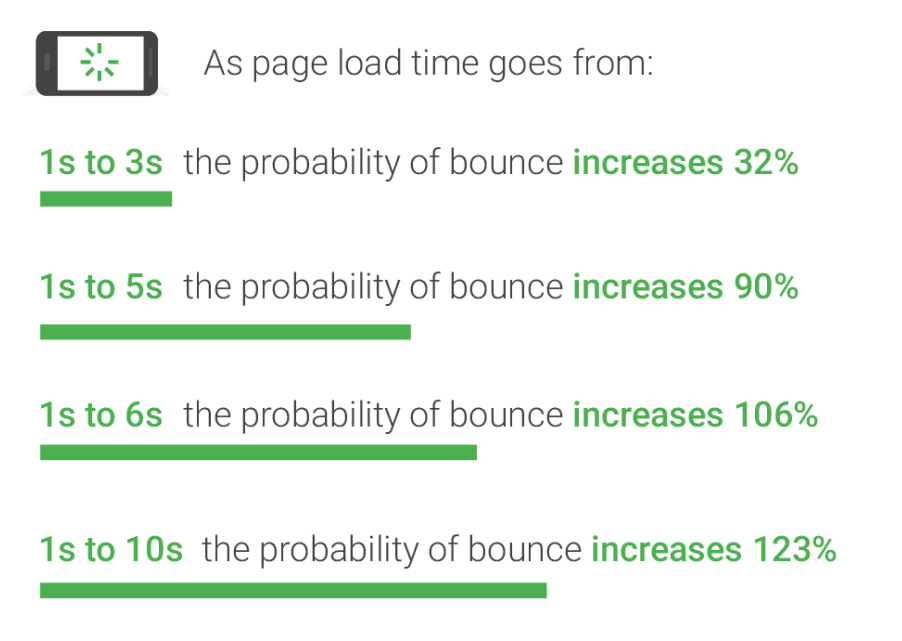
It’s no secret that slow load times cost you customers, and by extension, money.
Websites hosted on VPS environments consistently handle more traffic with stable performance because they allocate dedicated resources instead of sharing them with dozens of other sites.
Reportedly, websites hosted on VPS environments load 15 to 35% faster than the same websites running on shared servers. Faster load times mean lower bounce rates, stronger engagement, and more completed checkouts.
Pro tip: Audit your current load times during peak traffic. If your TTFB exceeds 400 ms during campaigns and promotions, you are likely leaving conversions on the table. Move before you scale your marketing spend.
Reason #2: Helps Scale Resources When Traffic Surges Uncontrollably
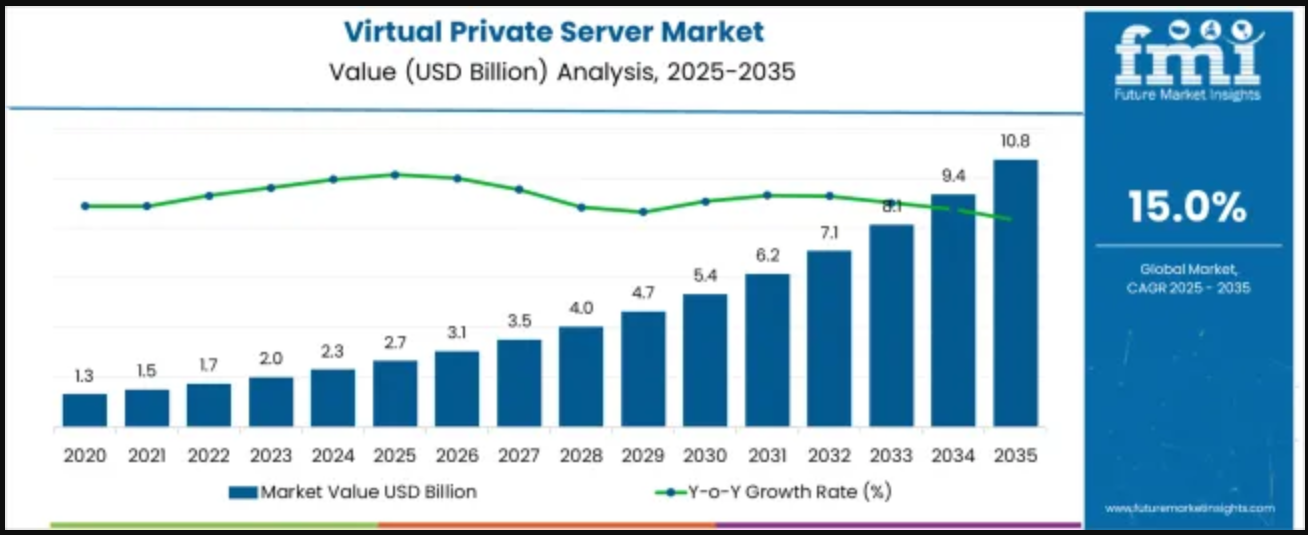
VPS hosting’s market value is projected to reach $3.1 billion by 2026 as more small and medium businesses prioritize performance and scalability over low-cost hosting.
This growth reflects real demand for environments that let you plan for spikes, handle seasonal demand, and avoid sudden outages.
Pro tip: Set performance thresholds (page load, error rate) for your busiest days and plan your VPS configuration around staying below those thresholds.
Reason #3: Reduces Downtime That Costs You Sales
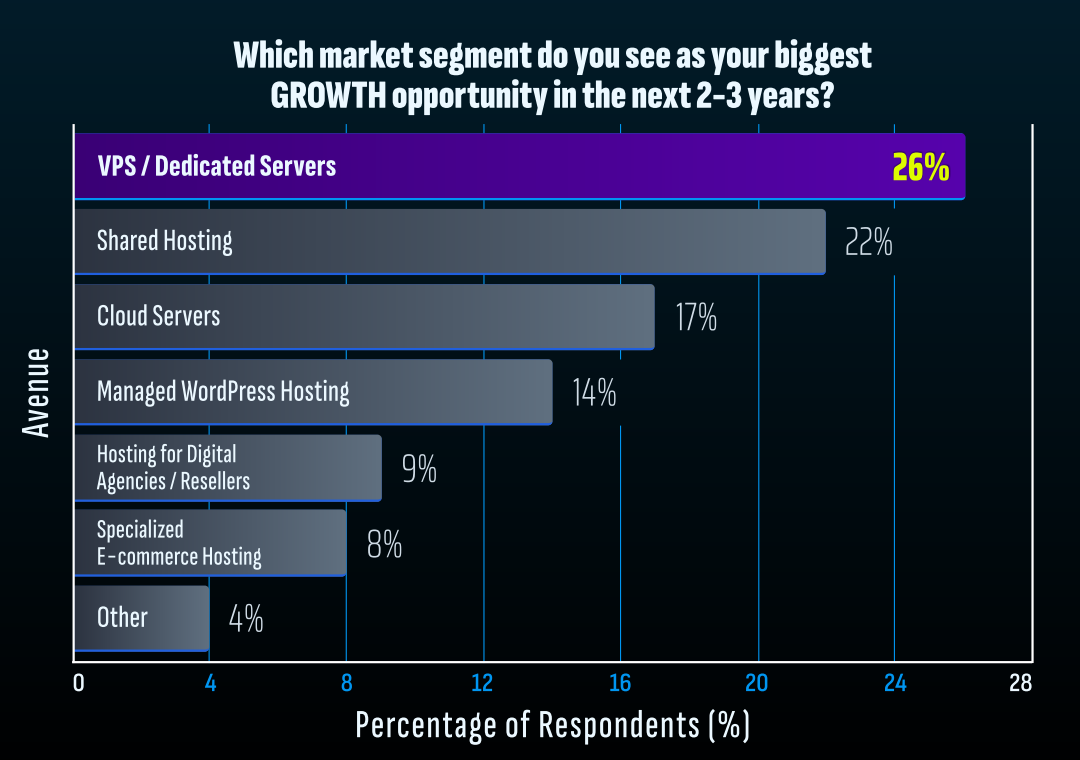
Data shows that security, performance, and automation are top priorities for businesses investing in hosting in 2026 and beyond.
This is probably why dedicated and VPS hosting has emerged as the biggest growth opportunity for 26% respondents in the next 2-3 years:
Pro tip: Review your uptime logs over the past 90 days. If you notice dips during traffic increases as well as campaigns, your hosting environment is likely the weak link.
Is VPS Hosting for You?
Needless to say, VPS hosting sits in a strategic spot in 2026: It is widely viewed as the primary upgrade path for businesses moving beyond entry-level shared plans.
As websites become revenue channels instead of simple online brochures, infrastructure decisions start influencing real business outcomes.
So, should you invest in it?
Ask: Does Your Site Require Better Performance and Stability?
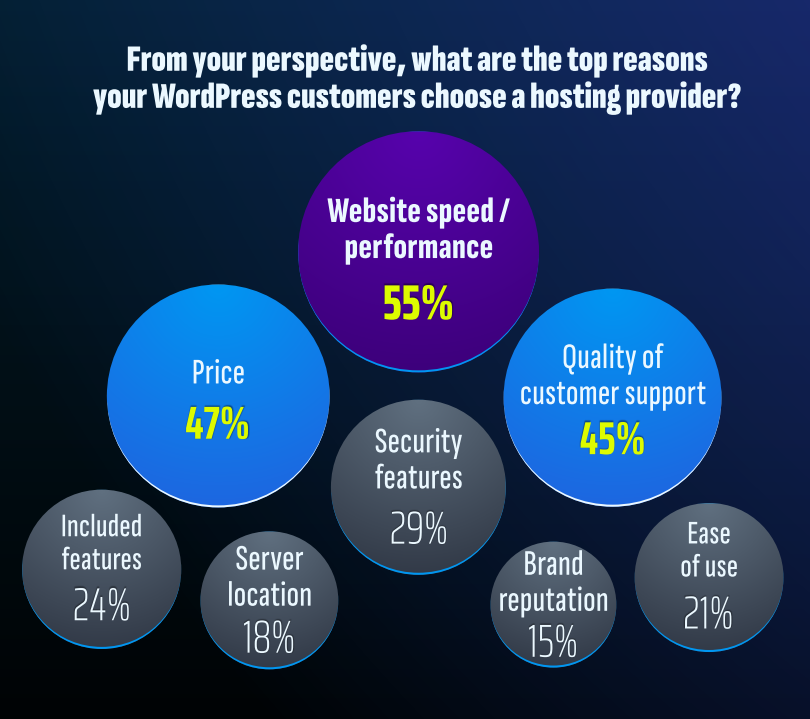
For 55% of site owners, site speed and performance are major competitor differentiators. You know what this means right? More than half of your competitors are actively thinking about how fast and stable their websites feel to users.
If your pages slow down during promotions, product launches, and traffic spikes, you are already competing at a disadvantage. After all, your visitors won’t wait. They will leave, compare, and buy elsewhere.
VPS hosting gives you dedicated resources that keep performance consistent even when demand increases. You are no longer sharing processing power with dozens of unrelated websites. This isolation translates into predictable speed, better user experience, and stronger conversion potential.
Ask yourself:
- Do customers ever experience delays during checkout or form submissions?
- Do load times increase during campaigns?
- Are you confident doubling traffic tomorrow?
Ask: Are You Planning Growth in the Next 6 to 12 Months?
Growth rarely happens gradually. It comes in bursts through campaigns, partnerships, and, let’s not forget, seasonal demand.
Shared hosting caps your resources. When traffic rises beyond those limits, performance drops. VPS hosting allows you to increase CPU and RAM as your traffic forecasts change.
Ask yourself:
- Are you planning to increase ad spend?
- Are you expecting holiday or seasonal traffic spikes?
- Do you have product launches scheduled?
If you answered yes to any of these, scalable infrastructure should already be part of your planning.
Ask: Do You Need More Control Over Your Hosting Environment?
As your website evolves, technical needs grow with it. You may need advanced caching, background processes, custom software, or security configurations.
Shared hosting restricts what you can install and configure. VPS hosting gives you root-level access and full control over your environment.
Ask yourself:
- Have you delayed features due to hosting limitations?
- Has your developer ever said a configuration change is not possible on your current plan?
If so, your hosting is dictating your roadmap.
Ask: Is Your Website Directly Responsible for Revenue?
When your site handles transactions, bookings, subscriptions, or high-value leads, performance stops being optional.
Downtime or instability directly affects revenue. VPS hosting isolates your resources so external accounts cannot impact your availability.
Ask yourself:
- How much revenue depends on your website each month?
- Can you afford performance disruptions during peak demand?
If the answer makes you uncomfortable, your infrastructure deserves a revisit.
Ask: Are You Thinking Long-Term Instead of Month-to-Month?
If you expect steady growth, expansion into new markets, or increasing customer acquisition efforts, you need infrastructure that grows with you.
VPS hosting positions you between restrictive shared plans and expensive dedicated servers. It supports expansion without forcing premature enterprise-level spending.
Ask yourself:
- Where do you want your website to be in 12 months?
- Will your current hosting support that vision without another migration?
If not, the upgrade decision is already clear.
How to Choose the Right VPS Hosting?: 5 Strategies to Know
Selecting a VPS plan is a business decision, there’s no two ways about it.
The wrong choice will show up in slow checkout flows, campaign underperformance, and late-night support tickets. And the right choice? It gives you predictable performance when traffic rises and flexibility when your roadmap evolves.
Here are five practical strategies to help you choose wisely:
Tip 1: Start Reading Your Traffic Like a CFO
Who is it for: Founders whose revenue depends on peak-hour performance, especially ecommerce stores, course platforms, and high-ticket service sites.
Let’s clear something at the outset: You do not need a bigger server. You need the right-sized one.
Most site owners look at average monthly traffic and pick a plan. This metric hides the real story. Revenue usually clusters into specific hours. Campaigns compress demand into short windows. Checkout activity spikes after email sends.
If you size your VPS around averages, you are underprepared for the moments that matter most.
How to implement this:
- Pull hourly traffic and revenue data for the last 90 days. Identify your top 10 highest-traffic hours.
- Check server response time during those windows. If response time increases by more than 30 percent under load, your infrastructure is tight.
- Choose a VPS plan based on peak concurrent users, not monthly visits.
- Leave at least 40% resource headroom above your highest recorded usage.
Red flags to note:
- You choose a plan based on storage space instead of CPU and RAM.
- The provider cannot explain how CPU allocation works.
- You have no visibility into real-time resource usage.
- You size hosting around what you pay, not what you earn.
- You rely on “unlimited” claims without technical specifics.
Tip 2: Plan for Your Busiest Day, Not Your Average One
Who is it for: Founders running seasonal sales, launch cycles, paid acquisition campaigns, or email-driven spikes.
On paper, most VPS plans look impressive. More cores. More RAM. Bigger numbers. What matters is how consistently those resources perform when demand rises.
Performance issues rarely show up at low traffic. They appear when you need your site to hold steady. A checkout page that loads in 1.2 seconds at midnight but crawls at 3 seconds during a sale is a revenue leak.
A VPS plan should be selected around your highest expected demand and not your current comfort zone.
How to implement this:
- Identify the single highest-traffic day in the last 6 months. Use that as your baseline, not your average month.
- Estimate the upside of your next campaign. Add at least 30% above that projection.
- Choose a VPS configuration that handles peak concurrent sessions without maxing CPU usage.
- Confirm with the provider how performance behaves when usage crosses 70% of allocated resources.
Red flags to note:
- You are choosing a plan because it fits your current budget (not your projected growth).
- The host cannot explain what happens when CPU usage hits 100%.
- Scaling requires full server migration.
- There is no real-time resource monitoring dashboard.
- The provider markets entry pricing heavily but stays vague about performance ceilings.
Tip 3: Know Exactly What You’re Paying For Before You Commit
Who is it for: Founders who care about margins, renewal pricing, and long-term cost control, especially subscription businesses and ecommerce brands operating on tight CAC targets.
VPS pricing looks straightforward at checkout. Reality often reveals itself 12 months later at renewal.
Introductory discounts can drop 40% to 70% in the first year. Add-ons such as backups, security layers, control panels, and priority support quietly increase the total monthly cost. If you only evaluate the headline price, you underestimate your real infrastructure expense.
Remember, hosting is not just a monthly bill. It becomes part of your cost per acquisition and operating margin.
How to implement this:
- Compare first-year pricing and renewal pricing side by side. Calculate the percentage increase before committing.
- Ask for a complete breakdown of included features versus paid add-ons.
- Factor backup storage, security tools, and scaling costs into your monthly estimate.
- Lock in multi-year pricing only if performance, support, and scalability justify the commitment.
Red flags to note:
- Renewal pricing increases by 50% or more without clear disclosure.
- Backups, SSL, or basic monitoring are billed separately.
- Support tiers are paywalled.
- The contract length is long but cancellation terms are vague.
- The provider focuses heavily on discounts instead of infrastructure transparency.
Tip 4: Make Sure You Can Actually Run Your Stack the Way You Want
Who is it for: Founders running ecommerce platforms, custom applications, learning portals, or content-heavy sites where technical flexibility directly affects performance.
As your business grows, you introduce performance plugins, custom scripts, background jobs, analytics tools, and integrations. Every one of those adds server load and configuration needs.
A VPS should allow you to shape the environment around your application. If the server dictates how you build, you are limiting your own roadmap.
How to implement this:
- Confirm the level of server access you receive and what configurations you can modify directly.
- Ask whether you can adjust memory limits, caching layers, and PHP versions without submitting tickets.
- Check if you can run scheduled background tasks at the frequency your application requires.
- Deploy a staging environment and test how easily you can fine-tune performance before going live.
Red flags to note:
- Core settings require manual approval from support every time you request changes.
- Background tasks are heavily restricted.
- You cannot install monitoring or performance tools.
- Documentation feels surface-level and avoids technical specifics.
- Your developer works around limitations instead of optimizing freely.
Infrastructure should support how you build and operate. If you constantly adapt your application to fit hosting constraints, you are absorbing unnecessary friction.
Tip 5: Choose Support You Can Rely On When Revenue Is at Stake
Who is it for: Founders whose websites handle daily transactions, lead generation funnels, client bookings, or time-sensitive campaigns.
Technical issues rarely show up at convenient times. They surface during launches, promotions, or peak traffic windows. In those moments, response speed matters more than feature lists.
Many providers advertise 24x7x365 support. What matters is the depth of that support and how quickly you reach someone who understands infrastructure.
How to implement this:
- Submit a technical pre-sales question and evaluate how detailed and clear the response is.
- Ask about average first-response time for critical server-level issues. Get a number, not a promise.
- Confirm escalation paths for urgent outages and whether senior engineers are accessible.
- Review support channels. Live chat, ticketing, and phone access should align with your business hours.
Red flags to note:
- Support responses feel templated or generic.
- You receive vague timelines for issue resolution.
- Escalation procedures are unclear.
- Priority support requires a hidden add-on upgrade.
- Documentation fails to address real-world operational scenarios.
Support is part of your infrastructure. When your website drives revenue, slow or shallow assistance can cost more than the hosting plan itself.
Put Every VPS Provider Through This Reality Check
| Evaluation Area | Ask the Provider | A Strong Answer Looks Like | An Unacceptable Answer Sounds Like |
| 1. CPU Allocation | How are CPU cores assigned and isolated? | Clearly defined dedicated vCPU allocation with resource isolation per account | “Shared cores” with no explanation |
| 2. Upgrade Speed | How long does vertical scaling take? | Resource upgrades within minutes with minimal downtime | “Submit a ticket and wait” |
| 3. Load Handling | What happens when usage hits 80% capacity? | Clear throttling behavior and upgrade path explained | “It depends” |
| 4. Storage Type | Is storage NVMe or SSD? What are the IOPS limits? | NVMe with defined performance benchmarks | Storage type not specified |
| 5. Backup Policy | How often are backups taken and where stored? | Automated daily backups stored off-server | Backups cost extra or unclear frequency |
| 6. Monitoring | Do I get real-time usage visibility? | Dashboard with CPU, RAM, and disk metrics | No real-time reporting |
| 7. SLA & Support | What is your guaranteed outage response time? | Defined SLA with measurable response window | “We respond quickly” |
| 8. Renewal Pricing | What happens to pricing after year one? | Transparent renewal rates disclosed upfront | Discount-heavy first year, vague renewals |
| 9. Migration Help | Do you assist with migration and testing? | Assisted migration with performance validation | Migration is DIY |
| 10. Exit Flexibility | Can I migrate out easily if needed? | Full backup access and simple cancellation | Long contracts or unclear exit terms |
Power Your Next Phase of Growth with BigRock VPS Hosting
As your business expands, your website moves from being an online presence to becoming a revenue engine. Product launches, paid campaigns, repeat customers, and holiday traffic all rely on consistent performance. Put another way, the infrastructure behind your site directly affects how confidently you can execute these plans.
VPS hosting gives you defined resources that support sustained growth. It allows you to plan scalable hosting solutions around upcoming campaigns, expected traffic increases, and long term expansion goals without reworking your setup each time demand rises.
With BigRock, you can choose a VPS hosting virtual private server plan based on your current traffic and upgrade it as your business scales. This flexibility helps you align technical decisions with marketing calendars, sales cycles, and future milestones.
So, map out your next major initiative. Estimate the traffic it could generate. Then make sure your hosting can support said level of demand before you launch. Growth feels different when your foundation is already prepared. Ready to turn site growth into lasting momentum? Sign up now!
FAQs
1. When should you upgrade to VPS hosting for your growing website?
You should consider VPS hosting when your website starts slowing down, experiences traffic spikes, or needs better security and control. If shared hosting feels restrictive or you plan to scale your products, content, or customer base, VPS gives you dedicated resources that grow with you.
2. How does VPS hosting improve website performance compared to shared hosting?
With VPS hosting, your website gets its own allocated server resources. That means your speed and uptime are not affected by other websites. For SMEs running eCommerce stores, lead generation campaigns, or high traffic blogs, this stability directly impacts conversions and customer trust.
3. Is VPS hosting suitable for small and medium businesses?
Yes. VPS hosting works well for SMEs that are growing beyond basic hosting needs but do not require a full dedicated server. It gives you better control, stronger security, and room to expand without the higher cost of enterprise infrastructure.
4. How do you choose the right VPS hosting provider in India?
Look for performance reliability, data center location, security features, scalability options, and responsive support. For example, providers like BigRock offer VPS plans tailored for Indian businesses, which can help if your audience is region specific and you need lower latency and local support.
5. What are the key benefits of VPS hosting for eCommerce websites?
If you run an online store, VPS hosting helps you handle more visitors, process transactions smoothly, and maintain faster load times. This improves user experience and reduces abandoned carts. As your catalog and traffic grow, VPS gives you the flexibility to scale without migrating again.
6. How difficult is it to migrate from shared hosting to VPS?
Most hosting providers assist with migration. If you choose a managed VPS plan from a provider such as BigRock, their support team typically helps move your website with minimal downtime. This makes upgrading far less technical than many business owners expect.
7. What is the difference between managed and unmanaged VPS hosting?
Managed VPS is ideal if you want the hosting provider to handle server setup, updates, and security. Unmanaged VPS gives you full control, which suits businesses with in-house technical expertise. Your choice depends on how much time and technical skill you can dedicate to server management.